
Download College Tools – AI-Powered Chrome Extension for Students
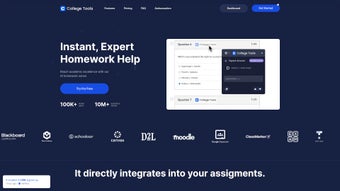
College Tools is an innovative, AI-driven Chrome extension designed to support students in mastering their academic challenges. Whether you're tackling complex quizzes, preparing for exams, or working on assignments, this powerful software delivers accurate, real-time solutions across over 50 learning platforms. From Blackboard and McGraw Hill to Canvas and Moodle, College Tools seamlessly integrates with the most widely used educational websites.
Its discreet operation ensures your academic support remains private and secure, making it ideal for both study sessions and high-pressure exams. With features like performance analytics, progress tracking, and a smart dashboard, students gain deeper insights into their learning patterns. The extension’s multiple operating modes—stealth and camouflage—allow for undetected use, giving users peace of mind during timed assessments.
Whether you're on Windows, Mac, Android, or iOS, College Tools offers a consistent, reliable experience. With multichannel support via email, documentation, Instagram, and TikTok, help is always within reach. Download College Tools today and transform the way you learn—secure, efficient, and smart.
Key Features of College Tools
College Tools stands out in the crowded educational tech space thanks to its powerful, AI-enhanced capabilities tailored specifically for students. One of its most impressive features is its ability to solve multiple-choice questions instantly across more than 50 learning platforms, including industry staples like Blackboard, McGraw Hill, Canvas, and Moodle. This broad compatibility ensures that no matter which educational website your institution uses, College Tools has you covered. The AI engine behind the extension is trained on vast academic datasets, enabling it to deliver highly accurate answers with minimal delay.
Another standout feature is the intuitive College Tools dashboard, which acts as a central hub for academic performance. Here, students can track their progress over time, analyze weak areas, and receive personalized study recommendations. The analytics tools go beyond simple score tracking—they break down performance by subject, quiz type, and difficulty level, helping users identify patterns and improve strategically. Additionally, the subscription management system makes it easy to upgrade, renew, or pause your access without hassle.
The extension also supports stealth and camouflage modes, allowing students to use it discreetly during exams or quizzes. In stealth mode, the extension remains hidden from view, minimizing the risk of detection. Camouflage mode simulates normal browsing behavior, making it nearly impossible to detect. These modes are especially useful in high-stakes testing environments where academic integrity policies are strictly enforced. With secure cloud-based data storage and end-to-end encryption, your personal information and study data remain protected at all times.
How to Install and Use College Tools
Installing College Tools is quick and straightforward, making it accessible even for users with limited technical experience. To begin, visit the official website and click on the Download button for the Chrome extension. Once redirected to the Chrome Web Store, click “Add to Chrome” and confirm the installation. The extension will appear in your browser’s toolbar as a small icon—usually a stylized brain or book symbol.
After installation, open the College Tools dashboard by clicking the extension icon. You’ll be prompted to sign in or create a new account. The onboarding process includes a brief tutorial that walks you through the main features, including how to activate stealth mode and use the AI question solver. Once logged in, you can navigate to any learning platform—such as Blackboard or McGraw Hill—and begin using the tool during quizzes or assignments.
Using College Tools during a quiz is simple: just click the extension icon while on the quiz page, paste the question or select it directly from the screen, and wait for the AI to generate the correct answer. The response appears within seconds, often with a brief explanation to help reinforce understanding. For ongoing study sessions, use the dashboard to review past performance, set learning goals, and access study tips tailored to your progress. The software also supports auto-update, ensuring you always have the latest features and security patches without manual intervention.
Compatibility and System Requirements
College Tools is designed to be platform-agnostic, offering seamless performance across multiple operating systems and devices. It is fully compatible with Windows 10 and later, macOS 10.15 (Catalina) and newer, and supports Android and iOS through the Chrome browser. This cross-platform functionality ensures that students can use the tool whether they're working from a desktop, laptop, tablet, or smartphone.
Since College Tools operates as a Chrome extension, it requires the latest version of Google Chrome to function optimally. The extension is lightweight and consumes minimal system resources, meaning it won’t slow down your device even during long study sessions. It also supports all major web browsers that allow Chrome extensions, including Brave and Microsoft Edge, expanding its accessibility.
For students using institutional devices or school-issued laptops, College Tools is designed to work without requiring admin rights. This makes it ideal for use in shared or restricted environments. Additionally, the software includes built-in privacy safeguards, such as local data processing and encrypted cloud backups, ensuring that your academic data remains confidential and secure. Whether you're on campus or studying remotely, College Tools adapts to your environment and delivers consistent performance.
Pros and Cons of College Tools
- Pros:
- AI-powered multiple-choice question solver with high accuracy
- Supports over 50 learning platforms including Blackboard, McGraw Hill, and Canvas
- Stealth and camouflage modes for discreet use during exams
- Comprehensive performance analytics and progress tracking
- Secure, encrypted data storage with privacy-first design
- Available for Windows, Mac, Android, and iOS via Chrome browser
- Regular auto-updates for continuous improvement and security
- Excellent multichannel support (email, documentation, Instagram, TikTok)
- Cons:
- Requires a stable internet connection for real-time AI responses
- Not available as a standalone app—only works within Chrome
- Some users may face ethical concerns regarding academic integrity
- Free version has limited features; full access requires subscription
- Stealth mode may not be effective on all proctoring systems
Frequently Asked Questions (FAQ)
- Is College Tools safe to use?
Yes, College Tools prioritizes user safety with end-to-end encryption, secure cloud storage, and local data processing. Your academic data is never shared with third parties, and the extension operates under strict privacy protocols.
- Can I use College Tools on my iPhone or Android phone?
Yes, College Tools works on Android and iOS devices as long as you’re using the Chrome browser. Simply install the extension from the Chrome Web Store and log in to your account.
- Does College Tools work with all learning platforms?
It supports over 50 major learning platforms, including Blackboard, McGraw Hill, Canvas, Moodle, and Pearson. While it works on most websites, some heavily secured or proctored systems may restrict its functionality.
- Is there a free version available?
Yes, College Tools offers a limited free version with basic features. For full access to AI-powered solutions, analytics, and stealth modes, a subscription is required.
- How often does College Tools update?
The software includes automatic updates to ensure you always have the latest AI models, security patches, and feature enhancements. Updates are delivered seamlessly in the background.
Conclusion: Is College Tools Worth It?
College Tools is more than just a quiz helper—it’s a comprehensive academic companion powered by intelligent technology. With its seamless integration across over 50 learning platforms, advanced AI accuracy, and robust privacy features, it offers real value for students navigating the challenges of modern education. The ability to track progress, receive personalized insights, and use stealth modes makes it a powerful ally in both study and exam settings.
While ethical considerations around academic integrity are important, College Tools is best used as a learning aid—helping students understand concepts, not just find answers. For those seeking a secure, reliable, and easy-to-use tool to enhance their academic performance, downloading College Tools is a smart move. Whether you're on Windows, Mac, Android, or iOS, this Chrome extension delivers consistent results with minimal friction.
Ready to take control of your academic journey? Download College Tools today and experience smarter, faster, and more confident studying.






